基础操作
Git 是软件开发中一个非常重要的工具,虽然现代编辑器大部分都集成了 Git 功能,但对于初学者,个人还是非常建议从命令行开始学习,这样对 Git 的理解会更加深刻。而且不必掌握所有操作,只要能够满足日常开发需求,后续在遇到问题时再从网上进行查阅即可。
概念理解
- 文件状态
- 未跟踪(untrack)
- 未修改(unmodified)
- 已修改(modified)
- 已暂存(staged)
- 工作区域
- 工作区
- 暂存区
- 本地仓库
- 远程仓库
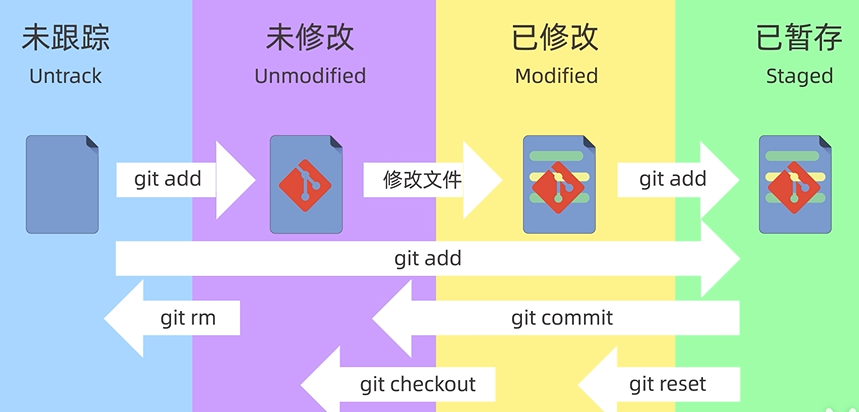
最最基础的操作
这部分操作基本覆盖了个人开发日常 72.96% (有小数点可信)的需求
# 克隆别人的仓库
git clone <url>

# 初始化一个 git 仓库
git init
# 初始化时顺便指定分支名
git init -b main

# 将文件添加到暂存区
git add <file>

# 将暂存区文件提交到本地仓库
git commit -m "提交信息"

# 添加远程仓库
git remote add origin <url>
# 查看远程仓库
git remote -v

# 将本地仓库推送到远程仓库
git push origin <branch>

# 拉取远程仓库
git pull origin <branch>
常用操作
分支
# 查看所有分支
git branch -a

# 创建并切换分支
git checkout -b <branch>

# 切换已经存在的分支
git checkout <branch>

# 删除分支
git branch -d <branch>
--amend
- 修改最近一次提交的信息
- 对最近一次提交的内容进行修改,特别适合用于漏提交文件的场景
- 最近一次提交已经在远程仓库的话,千万不能用
stash
git push 前如果有代码没有提交,会被打断的
我们可以使用 stash 来保存当前的改动,然后再 push 或 pull,操作完后再把改动恢复回来
适用场景: 1. 写完部分代码,但有部分代码还不想提交
# 放入暂存区
git stash
# 恢复之前暂存的改动
git stash pop
# 等同于 git stash
git stash push
# 指定某个文件,并添加 commit 信息
git stash push -m "commit message" file1 file2
# 查看 stash 记录
git stash list
# 恢复某个 stash 并删除 stash 记录
git stash pop stash@{0}
# 恢复某个 stash,但不删除 stash 记录
git stash apply stash@{0}
# 删除某个 stash
git stash drop stash@{0}
# 删除所有 stash
git stash clear
举例: * 功能开发一半,改了一个 bug * bug 比较重要需要先提交
git commit bug # commit bug
git stash # 把其他内容暂存起来
git pull --rebase # 以 rebase 方式拉取更新远程最新的代码
git push # 上传 commit 的 bug
git stash pop # 恢复之前暂存内容
PS:vscode 中的 stash 挺好用的,可以单独 stash 某个文件,结合 Git Graph 插件使用,可以指定对某个 stash pop/apply/drop
tag
软件开发离不开版本管理,使用 tag 可以方便标记版本,方便溯源
git tag <tag> # 在当前最新的提交记录上打 tag
git tag -a <tag> -m <tag commit> # 打 tag 并添加 commit 说明

git tag -d <tag> # 删除 tag

git push <remote> <tag>   # 推送指定 tag 到远程仓库
git push origin --tags # 推送所有 tag 到远程仓库
git push <remote> --delete <tag> # 删除远程仓库某个 tag

git tag # 查看当前仓库所有标签
git show <tag> # 查看标签节点具体信息
merge
rebase
reset
git reset 操作会丢失 commit 信息,因此建议使用 git revert 替代。通常我会在以下场景使用到:
1. 提交到错误的分支
2. 提交了不需要提交的代码
3. 代码未推送到远程仓库
4. 仅需要撤回最近一两个 commit
5. 仓库只有自己在维护
git reset --soft HEAD^ # 撤销最近一次提交,但保留工作区改动

git reset --hard HEAD^ # 回退到上个版本。
git reset --hard HEAD~n # 回退到前 n 次提交之前,若 n=3,则可以回退到 3 次提交之前。
git reset --hard commit_sha # 回滚到指定 commit 的 sha 码,推荐使用这种方式。

# commit_sha 可以在远程仓库里、或者 git log 命令查看
git reset --hard 05ac0bfb2929d9cbwiener75e52ecb011950fb
reset 三个参数的区别:
* --soft:只撤销 git commit,不撤销 git add,不删除工作空间代码改动
* --hard:撤销 git commit、git add,删除工作空间代码改动,恢复到上一次 git commit 的状态
* --mixed:撤销 git commit、 git add,不删除工作空间代码改动,reset 默认参数
如果 reset 涉及到远程仓库修改(reset 后的记录与远程仓库不同步),在 push 时需要强制推送
个人习惯
- 初始化的时候指定一个分支名
- 每次提交之前先看一下远程仓库有没有更新,如果有更新先拉取,避免冲突
push或pull一般不指定-u,显式指定要操作的分支,可以避免一些失误- 现代编辑器已经有
Git集成,常用操作一般在编辑器里完成、比如add、stash等